 a3c
a3cAvailable
macOS
macOS 13 or later
Download on the Mac App Store →a3c turns on hidden Audi and Volkswagen features, changes the MMI language, reads fault codes and handles SFD. You see every change before it is written, and one click puts it back.
Mac App Store · English, Deutsch, русский · Telegram →
a3c is available on the Mac App Store. iOS and Android apps are in development.
macOS 13 or later
Download on the Mac App Store →For your iPhone
For your Android phone
Subscribe to @a3coder and follow the project as it grows.
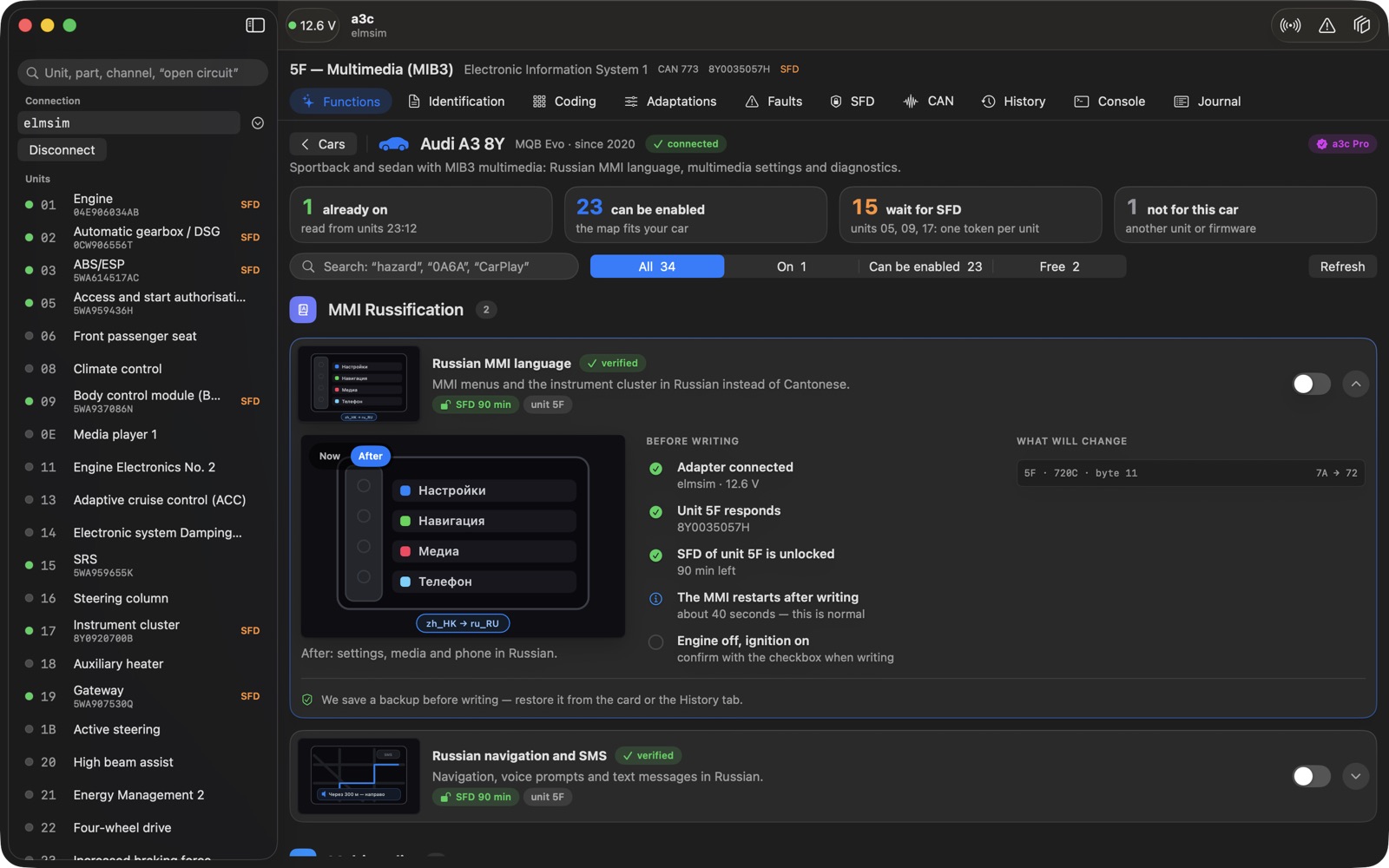
From a one-click function to a single bit of long coding. a3c shows what is already on in the car and what will change.
MMI language, CarPlay, radio logos, lights, sounds, instrument cluster. Each has an honest status: verified on a car or a map only.
Every changed byte is visible before the write. A backup is made automatically, and history keeps before → after.
Long coding for any control unit: HEX and single bits, with what will change highlighted.
Fault codes from every unit with failure type, status, mileage and time. Clearing only after you confirm.
Unit protection status, the activation request and token entry right in the app.
Part numbers, software versions and FAZIT for every unit after a single scan.
The function swaps the Cantonese slot in dataset 720C for Russian and recalculates the checksum. Length and all other bytes stay the same, so rolling back is a plain write of the original from the backup.
Navigation, voice prompts and SMS are a separate function. The first screen, the main menu and voice control stay in other languages: the Asian firmware has no such resources.
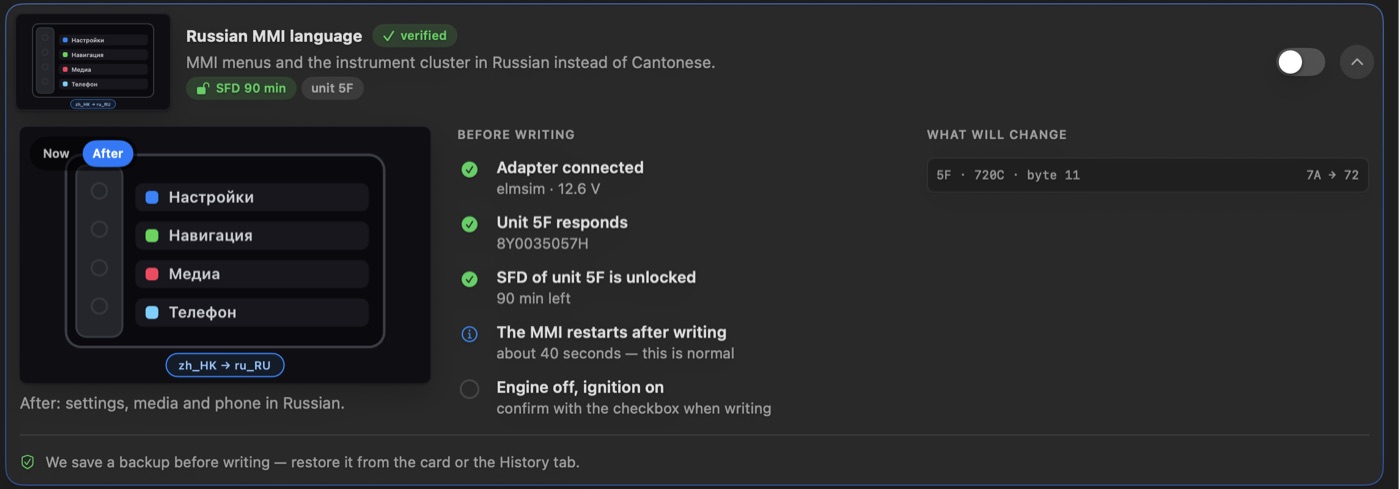
No wiring diagrams or checksum calculators — a3c checks everything itself.
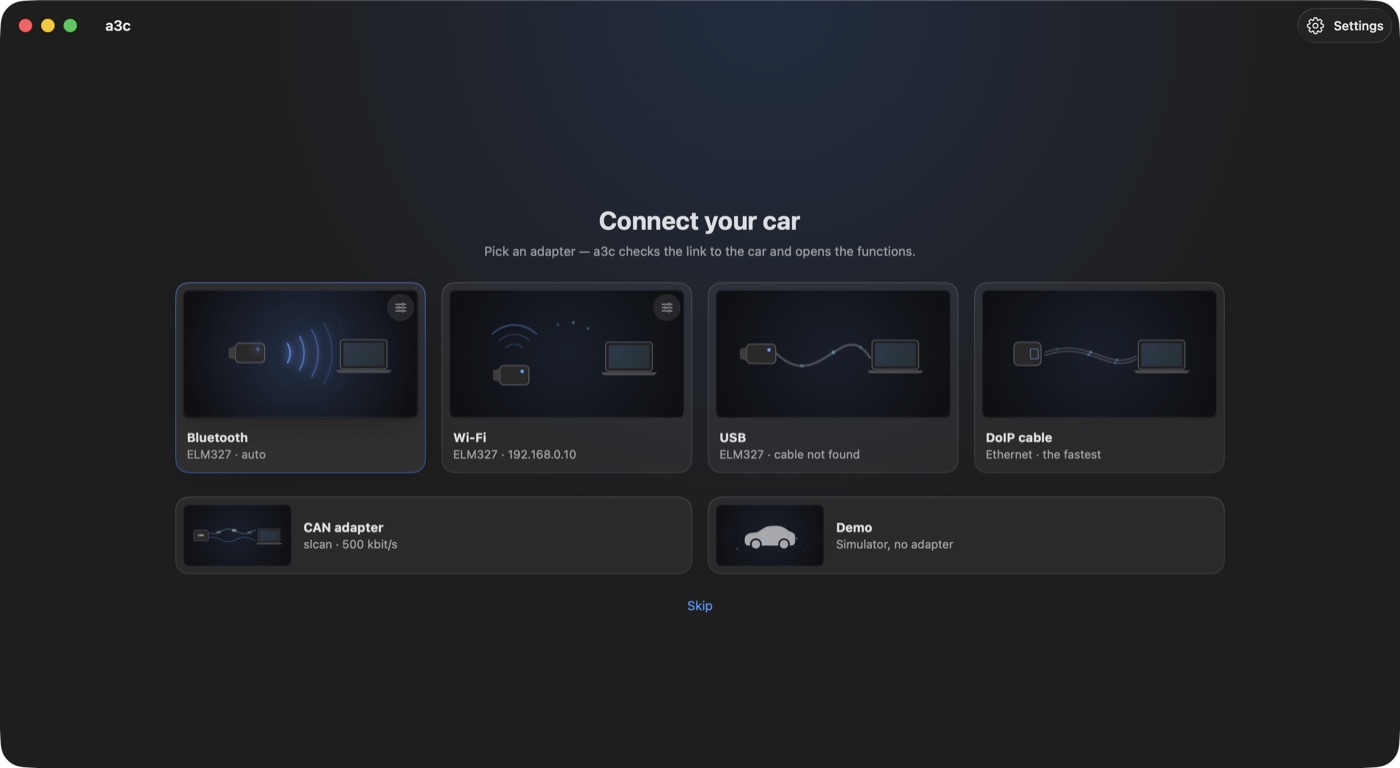
ELM327 over Bluetooth, Wi‑Fi or USB, or a DoIP cable. a3c checks the adapter, the link to the car and the voltage.
a3c reads the units and shows what is on, what can be turned on and which units wait for SFD.
Preview, backup, write. Changed your mind? Put it back from history.
The function catalogue updates from the server: new cars and functions arrive without an app update.
Compatibility with a particular car, unit and firmware is not guaranteed: a3c checks the unit and will not offer a map that does not fit it.
a3c works with inexpensive ELM327 adapters and with a DoIP cable.
| Adapter | Link | What for |
|---|---|---|
| ELM327 Bluetooth LE, e.g. Vgate iCar Pro | Bluetooth | Everything: reading, coding, faults, SFD |
| ELM327 Wi‑Fi | Wi‑Fi | The same; the Mac joins the adapter's network |
| ELM327 USB | USB | The same, over a cable |
| DoIP cable (ENET) | Ethernet | Fast reading and writing |
a3c Pro is a monthly or yearly subscription in the Mac App Store. See the price on the app page.
Freeno sign-up
Subscriptionmonthly or yearly, in the Mac App Store
a3c does not ask for an account. Server requests carry only the app, macOS and language versions: no device ID, no VIN, no Apple ID. The VIN and car data stay on your Mac.
Privacy policy →Only to download the function catalogue the first time. After that a3c works offline: the catalogue is stored on the Mac, and the link to the car does not use the internet.
Any ELM327 with Bluetooth LE, Wi‑Fi or USB — for example, Vgate iCar Pro. A DoIP (ENET) cable is faster.
SFD protects control units on newer VAG cars: without activation a unit refuses changes. a3c shows the request string and accepts the token; the token itself comes from an official or third-party activation service.
Any write to control units carries risk. a3c shows changes in advance, keeps a backup and lets you put things back, but the decision to write is yours. Read the safety rules first.
No personal data and no identifiers. The server sees only the app and engine versions, the macOS version and the language. Details are in the privacy policy.
Yes: a3c has a simulator — a whole car in memory. You can learn every screen with zero risk.
Scanning and diagnostics are free, no sign-up.